Holiday closures
We're closed on 24 and 31 December. Show this clearly on the contact page and next to the opening hours.
The notice appears in both places. In January, one sentence in the chat removes it again.
New opening hours? A different photo? Type what you want to change in the chat. No technical know-how, no training. SEOX builds your website and looks after the tech. We work on your visibility on Google and build whatever else you need.

In our test, a change was live after about 80 seconds.
Many businesses run on a proven system such as WordPress, and it can do a lot. But someone who knows the system has to look after it.
Your visitors never see these jobs. Someone still has to do them.
Another update.
The system and its plugins need regular updates. Put them off, and the risk of attacks can rise.
The contact form vanished after the update.
Parts of a website often come from different vendors. After an update they may stop working together, so every update needs a backup first and a check afterwards.
We need help with this one.
Even the field for the opening hours can be hard to find. A different page layout or a link to your booking system takes expert knowledge.
The site keeps getting slower.
Over the years, images and features pile up. Spotting what slows the site down takes expertise.
Updating your opening hours shouldn't need technical help. With an AI website you change content by chat, and we handle maintenance and development.
Write what you want to change in plain sentences: replace text and images, adjust colours or add new pages.
Write what should be different, the way you'd explain it to a colleague.
The assistant makes the change and shows you the result in a preview.
The change goes live without an extra approval click. In our test it took about 80 seconds.
Log in on your own website to see how many people find you on Google and how many send an enquiry. If you advertise on Google, you also see what an enquiry costs. No switching between different tools.
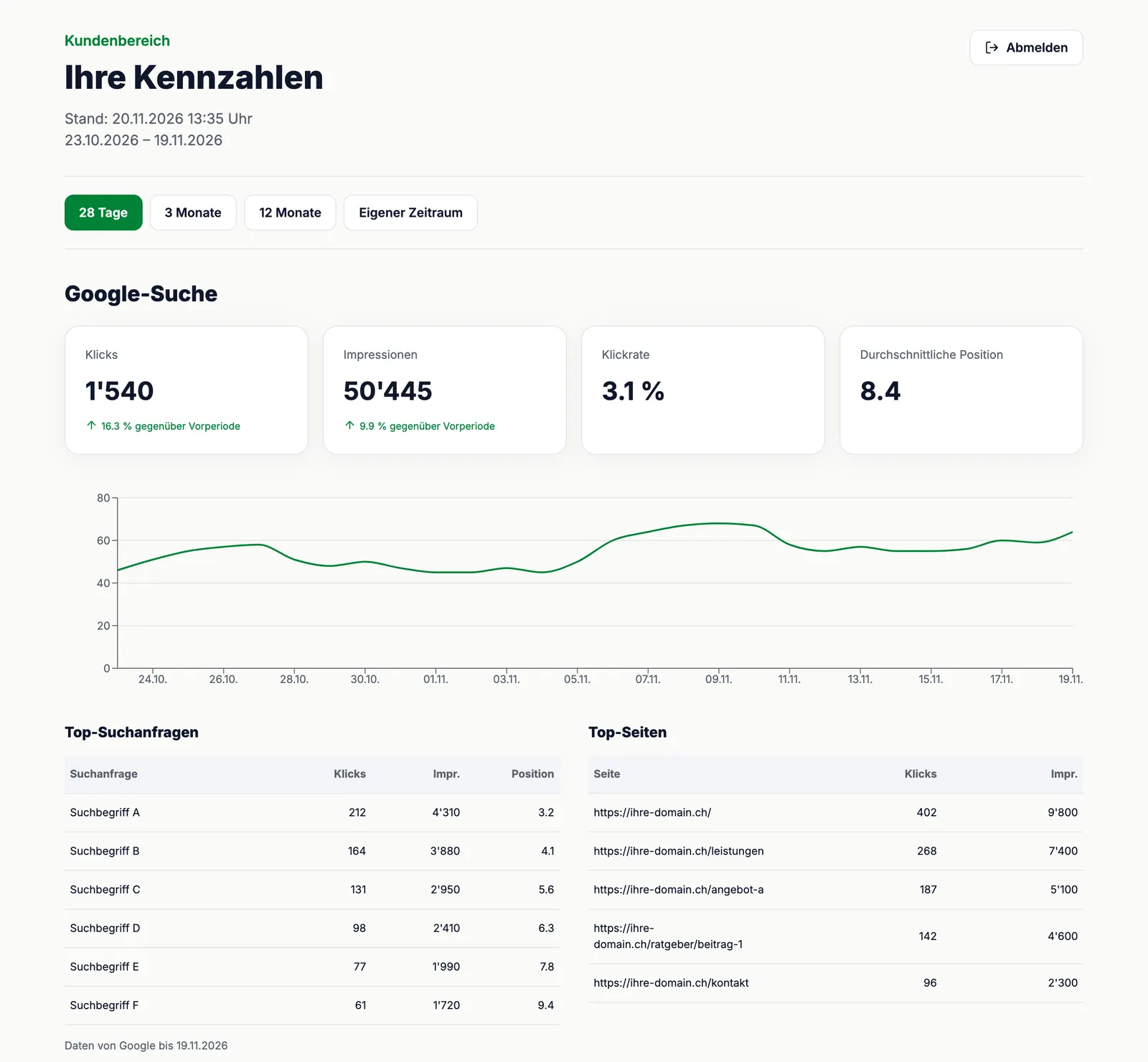
How often your website shows up in search and gets clicked, where it ranks, and the search terms and pages that bring the most clicks.
How many people visit your website, how many get in touch, and where they come from: search, ads, direct or other websites.
Your ad spend and clicks, the enquiries and other tracked actions they lead to, and what each one costs.
You change your content by chat. For a shop or a link to your existing systems, we do the programming.
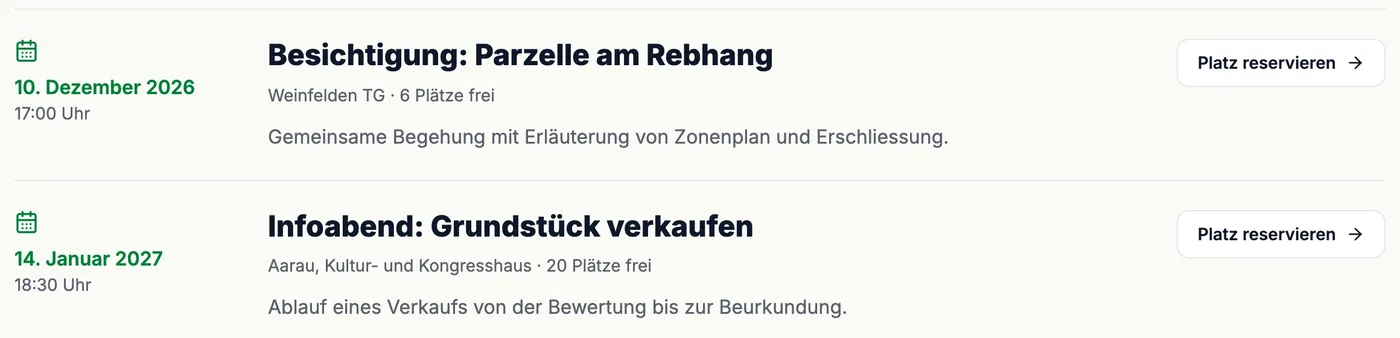
Add a date or an offer to the spreadsheet and the website shows it. No chat and no technical know-how needed. Past dates disappear automatically.
Your customers pick a package and a date, enter their details and pay. We connect a payment provider or your existing booking system for this.
You manage products, prices and stock in a spreadsheet and see orders in your client area.



We design the website around what you offer, with separate pages for individual regions or services. Menus with images and custom-built page sections are possible too.
An enquiry can land straight in your CRM. Free slots can come from your calendar, prices from your spreadsheet. More under Automating everyday workflows.
Your system needs a technical interface (API) for this. We check whether it works before we send a quote.
Multi-step forms, a calculator, a booking flow or a guide that helps people choose.
Your website in two or more languages, cleanly separated for visitors and search engines.
Clients, members or partners get their own access to the content meant for them.
You handle small changes yourself, whenever they come up. For the tech and extra features you have us to call on. We know your website because we built it.
Search engines and AI assistants read your website directly, because page titles, headings and text are already in the page code. How we keep working on your visibility is explained under Ongoing SEO management.
If you want to change a page URL or a main heading, the assistant asks first. On top of that, an automatic check compares every page with the day before, every night.
We restore the last working version. In our test this took three seconds. The code of your website belongs to you.
Pricing is on request. It depends on how many pages you need, what the website should do and which systems we connect.
Tell us what your website should do and which systems you already use.
We check what's feasible and send you a quote with effort and price.
We build the website and test it before it goes live.
We make sure the website and its links to other systems keep working, even when something changes on their side.
On top of the build there are running costs: the chat editor subscription, the domain and our support including hosting. Every item is listed separately in the quote. Price: on request.
You change an AI website by chat, in plain sentences. The assistant makes the change and shows it to you in a preview, then it goes live automatically. SEOX builds the website, looks after the tech and programs extra features.
You can change text and images, adjust colours and page sections or create new pages. You manage dates and offers in a spreadsheet, and the website picks up the entries.
We restore the last working version. In our test this took three seconds. In addition, an automatic check compares every page with the day before, every night.
Yes. For these changes the assistant asks first, because they matter for Google.
The technical groundwork is in place: Google can read the content of your pages directly. SEOX takes care of the work on your visibility on Google and in AI answers.
Yes. You keep your domain, and we set it up so it points to your new website.
You do. The code of your website belongs to you.
Yes, if your system offers a technical interface (API), for example your booking system or your CRM. We check whether the connection works before we send a quote.
In the call we show you a change made by chat and talk about what your website should do for your business. Prefer to write? Send us your enquiry through the form. You can work with us in English.
Book a free callLooking for a website without chat editing? For classic website projects, see our web design agency.