
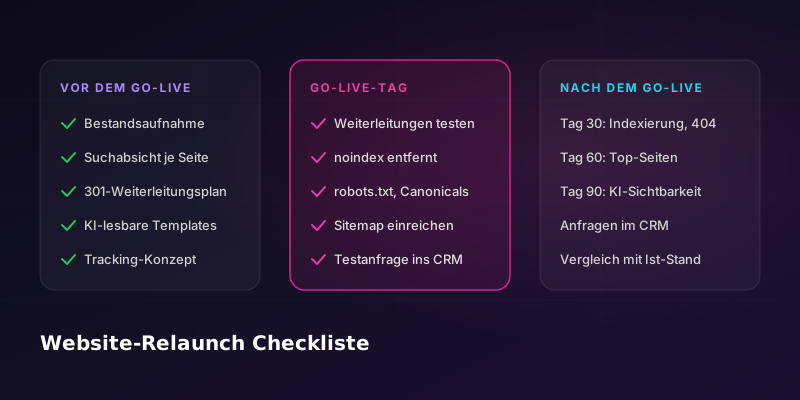
- The biggest risk in a relaunch is old URLs with no destination. A complete redirect map is the most important safeguard.
- Search intent comes before the new structure: for every old page, you decide whether to keep it, merge it, rework it or redirect it.
- AI crawlers such as GPTBot and ClaudeBot do not execute JavaScript. Important content therefore has to be in the HTML the server delivers.
- Measurement does not stop at the form. It goes all the way to the inquiry in your CRM, and the tracking plan is set before go-live.
- After go-live, there are fixed checkpoints at 30, 60 and 90 days.
This website relaunch checklist is meant for checking your own project. It follows the course of a relaunch from the initial inventory to the review after go-live. If you would rather have someone guide your project, you will find everything you need on the page about our SEO support for website relaunches.
What do you need to get right for SEO in a website relaunch?
For SEO, a website relaunch needs four things: an inventory of all URLs with their rankings and backlinks, a decision for each page based on search intent, a complete plan of 301 redirects and a review after go-live. On top of that, you need templates that AI systems can read too, and tracking that measures all the way to the inquiries.
| Area | Key question | Timing |
|---|---|---|
| Inventory | Which pages currently carry rankings, links and inquiries? | Concept phase |
| Search intent | Which intent does each page serve, and is it still needed? | Before the information architecture |
| Redirects | Does every old URL have exactly one new destination? | Before go-live, tested |
| AI-readable templates | Are content and schema in the delivered HTML? | When building the templates |
| Tracking and processes | Does every inquiry arrive in the CRM, measured? | Before go-live |
| Review | Are indexing, top pages and inquiries stable? | Launch day, then after 30, 60 and 90 days |
When should SEO join the relaunch project?
SEO belongs in the concept phase, before the information architecture and URL structure are fixed. If you plan the navigation and the page list without search data, you build structures that later have to be corrected with lots of redirects and rework. Brought in late, SEO can usually only limit the damage.
A sentence we often hear in projects: "Our web designer says SEO has been taken into account." That may be true. It is easy to check: Is there a list of all old URLs with their destinations? Is there a tracking plan? Has someone decided who tests what on launch day? If any of these is missing, SEO has not been taken into account yet.
Checklist 1: inventory before the relaunch
- Capture every URL of the old website, including old campaign pages, PDFs and pages that are no longer linked.
- For each URL, save the clicks and impressions from Google Search Console for the last twelve months.
- Flag pages that have backlinks from other websites.
- Flag pages that bring in inquiries, orders or sign-ups.
- Record the current technical state: status codes, canonical URLs, indexing, sitemap and robots.txt.
- Save the data before the old website is switched off. After go-live, you can no longer collect it.
This list later becomes the basis for the redirect map and for every comparison after go-live.
Checklist 2: search intent instead of a 1:1 copy
- For each page, check which search terms and full questions Google currently shows it for.
- Name the intent behind them: does the person want to understand something, find a provider or solve a specific problem?
- Decide for each page: keep, merge, rework or redirect.
- Combine pages that serve the same intent into one strong page.
- Note the gaps: intents for which there is no suitable page today.
The result is a matrix of old page, intent and decision. It usually leads to fewer landing pages that fit better. The guide Reverse Search Intent Engineering explains how to derive intent from Search Console data.
An example from our work: a Swiss healthcare provider moved its old website, including its URLs, to a new design with new content and a structure that AI systems can read more easily. Over the course of the relaunch and ongoing support, the domain's SISTRIX Visibility Index for Switzerland rose from 0.1214 (January 27, 2025) to 1.1246 (November 2, 2026), roughly nine times higher. How much of that is due to the relaunch itself cannot be separated out.
Checklist 3: URL mapping and 301 redirects
A redirect map assigns every old URL exactly one new URL with a 301 redirect. For site moves, Google recommends permanent server-side redirects such as 301 or 308 and states that they do not cost any PageRank (Google Search Central).
- Every URL from the inventory gets exactly one destination. The destination is the new page that fits the content best, not the homepage by default.
- Avoid redirect chains. Where you cannot avoid them, Google recommends ideally no more than three hops and fewer than five.
- Update internal links to point to the new URLs instead of running them through redirects.
- Test all redirects in a staging environment before go-live.
- Following Google's recommendation, keep redirects in place for as long as possible, generally at least one year.
Domain change and rebranding
For a domain change, everything above applies, plus two steps. For moving from one domain to another, Search Console has a Change of Address tool, which you submit for the old property. You then submit the new sitemap in Search Console. Google expects that for medium-sized websites it can take a few weeks or longer for the new URLs to replace the old ones in search results, and longer for larger websites (Google Search Central).
A domain change is not a harmless step. In an analysis by Search Engine Journal, 17% of the domain moves studied had not recovered their organic traffic after 1,000 days (Search Engine Journal, 2025). The study relies on estimates from third-party tools and covers pure domain changes only.
Merging several country websites
When several country websites are merged onto one platform, each country page needs its own destination in the new structure. Language and country versions are linked with hreflang annotations so that Google shows the right version. Country-specific content such as prices, legal texts and contact details must not get lost in the merge. Find out more on the page about international SEO.
Checklist 4: AI-readable templates
- Deliver content server-side. An analysis by Vercel shows that major AI crawlers such as GPTBot, ClaudeBot and PerplexityBot do not execute JavaScript (Vercel). Anything loaded later in the browser is invisible to them.
- Plan structured data directly in the template instead of adding it to individual pages afterwards.
- Provide building blocks for direct answers, FAQs and tables in the template so that content is clearly structured.
- Decide deliberately in robots.txt which AI crawlers may read the website.
The guide Website for AI agents explains how to prepare your website for AI agents. The matching service is Agent Readiness.
Checklist 5: tracking and the processes behind the website
- Set the tracking plan before go-live: which actions are measured, in which tool, under which names?
- Implement consent for cookies and tracking correctly and test it.
- Connect forms to the CRM or accounting system so that inquiries do not sit in an inbox.
- Send a test inquiry through the whole process, from the form to the CRM entry.
Without this step, you have nothing to compare against after go-live: you will not know whether the new website brings in more or fewer inquiries. How we implement tracking and integrations during a relaunch is described on the page about relaunch support with tracking and CRM integration.
Checklist 6: launch day
- Spot-check the redirects live, especially for the pages with the most clicks and backlinks.
- Check that no noindex was carried over from the staging environment.
- Check robots.txt: it must not block important sections.
- Check the canonical tags: they point to the new URLs.
- Submit the new sitemap.
- Send a test inquiry and check that it arrives in tracking and in the CRM.
The first 90 days after go-live
Google points out that rankings can fluctuate after major changes while the website is recrawled and reindexed (Google Search Central). Fluctuations alone are therefore no cause for alarm. What matters is that you can put them in context with data.
- Indexing: are the new URLs being indexed and gradually replacing the old ones?
- Error pages: are there new 404 errors or crawl errors in Search Console?
- Top pages: are the pages that previously had the most clicks holding their positions?
- AI visibility: is the brand still mentioned in AI answers? The guide Measuring AI visibility explains how to measure it.
- Inquiries: are as many or more inquiries arriving in the CRM?
These points are documented after 30, 60 and 90 days and compared with the inventory. For ongoing technical checks, the technical SEO checklist helps.
The most common relaunch mistakes
| Mistake | Consequence | How to avoid it |
|---|---|---|
| Old URLs without a redirect | 404 errors, lost rankings and backlinks | Complete redirect map based on the inventory |
| All redirects to the homepage | Signals from the old pages do not reach matching content | Each old URL to the new page that fits its content |
| All pages copied 1:1 | Old ambiguities and duplicate topics remain | A decision for each page based on search intent |
| Content only via JavaScript | AI crawlers do not see the content | Content delivered server-side |
| noindex carried over from staging | Pages drop out of Google's index | Checkpoint on launch day |
| Form tracking forgotten | No comparison of inquiries before and after the relaunch | Tracking plan and test inquiry before go-live |
| No data saved from the old website | Causes of losses can no longer be found | Save the inventory before switching off |
Traffic dropped after the relaunch: what now?
If traffic dropped after the relaunch, start your search with the redirects. Compare the pages that previously had the most clicks with their current state: Do they redirect correctly? Is the destination indexed? Is the content still there? Then check robots.txt, noindex tags, canonicals and whether content is only loaded via JavaScript. Without saved data from the old website, the analysis is harder, but Search Console shows clicks per page going back 16 months. The guide Traffic drop: finding and fixing the causes covers other possible causes and the order in which to check them. If you need help, we analyze the case as part of our SEO support for website relaunches.
Updated: November 6, 2026 · Author: Baris Gündogdu, founder of SEOX GmbH
Sources: Google Search Central, Site Moves and Migrations, developers.google.com; Dan Taylor, How Long Should An SEO Migration Take?, Search Engine Journal, January 2025, searchenginejournal.com; Vercel, The rise of the AI crawler, vercel.com; SISTRIX Visibility Index for Switzerland, January 27, 2025 to November 2, 2026.